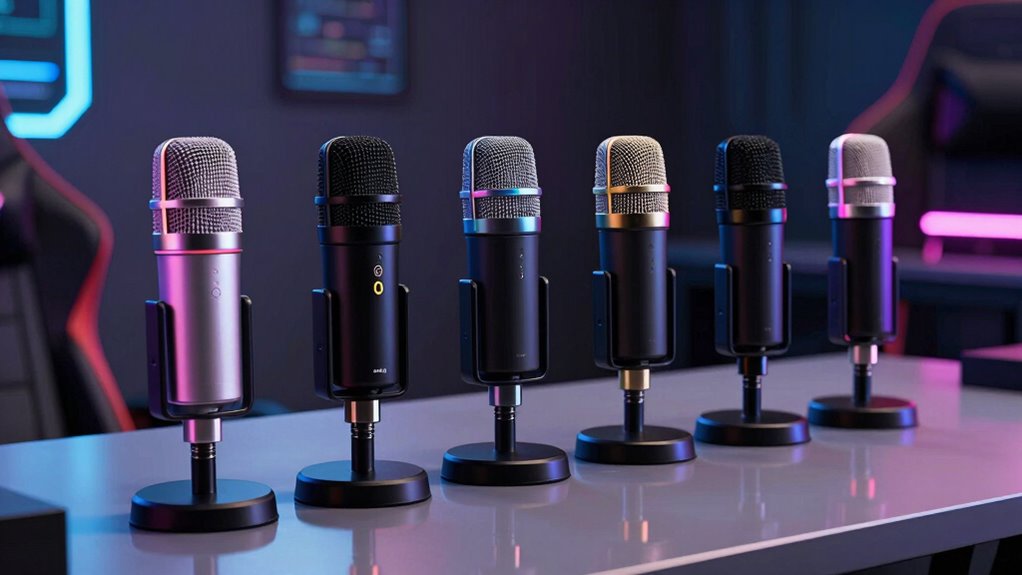

A great microphone for gaming has to do three things well: make your voice clear during chaotic game audio, resist picking up keyboard clicks and fan noise, and stay simple enough to use mid-match without fiddling with settings. After comparing ten popular options, the FIFINE AmpliGame AM8 earns the best overall spot because its dynamic capsule keeps background noise out while offering both USB and XLR for future upgrades. The MAONO DGM20S stands out as a strong value pick with onboard noise reduction, and the Razer Seiren V3 Mini is the best compact option for tight desks. The main tradeoff you’ll face in this category is between condenser mics that capture rich detail but hear everything in your room, and dynamic mics that stay focused on your voice but need you to speak close. Keep reading for the full breakdown of each pick and who each one suits best.

Get kitchen staples and gadgets delivered free with Prime
- Fast, free delivery on millions of items
- Prime Video, Amazon Music and more included
- Member-only deals all year
Complete the kit



Key Takeaways
- Dynamic capsules (FIFINE AM8, AM8T, and the USB-C/XLR dynamic model) consistently beat condensers at rejecting keyboard, fan, and roommate noise — the single biggest differentiator in this lineup.
- USB-only condenser mics under $50 like the MRSDY and generic PC/PS4/PS5 models deliver usable voice quality but demand a quiet room to sound their best.
- Bundled boom arms, like those in the FIFINE AM8T and TONOR TC310+ kits, changed the experience more than any spec sheet difference — positioning beats price for clarity.
- The Blue Yeti remains the most versatile pick thanks to its four pickup patterns, but its size and sensitivity make it a poor match for noisy, untreated rooms.
- RGB lighting and tap-to-mute are now standard even on budget models, so paying more should buy you better noise rejection or connectivity, not just aesthetics.
| MAONO DGM20S USB Gaming Microphone with Noise Reduction and RGB Lighting |  | Best Full Starter Kit | Model: DGM20S | Microphone type: USB condenser | Pickup pattern: Cardioid | VIEW ON AMAZON | See Our Full Breakdown |
| MRSDY USB Gaming Microphone with Noise Reduction, Mute, Gain, and RGB |  | Best Budget Entry Point | Connectivity: USB (Type-A), wired | Microphone type: Desktop condenser | Polar pattern: Unidirectional | VIEW ON AMAZON | See Our Full Breakdown |
| Razer Seiren V3 Mini USB Microphone, Supercardioid Condenser Mic, Black | 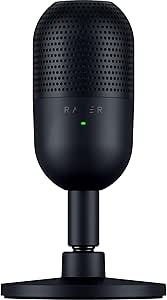 | Best Compact Pick | Type: Condenser microphone | Pickup pattern: Supercardioid | Connectivity: USB | VIEW ON AMAZON | See Our Full Breakdown |
| FIFINE AmpliGame AM8T Dynamic Gaming Microphone Kit with Boom Arm |  | Best Upgrade-Ready Kit | Microphone type: Dynamic | Connectivity: USB-C and XLR | Polar pattern: Cardioid | VIEW ON AMAZON | See Our Full Breakdown |
| FIFINE AmpliGame AM8 USB/XLR Dynamic Microphone for Gaming and Streaming |  | Best Overall | Connectivity: XLR, USB | Polar pattern: Unidirectional (Cardioid) | Frequency response: 50Hz–16KHz | VIEW ON AMAZON | See Our Full Breakdown |
| USB Gaming Microphone for PC, PS4, and PS5 |  | Best for Console Setups | Connectivity: USB | Polar pattern: Unidirectional (cardioid) | Frequency range: 20–2000 Hz | VIEW ON AMAZON | See Our Full Breakdown |
| Dynamic Microphone with USB-C/XLR for Podcast, Streaming, Gaming, and Singing |  | Best for an Upgrade Path | Microphone type: Dynamic | Connections: USB-C, XLR | Frequency response: 50Hz–16KHz | VIEW ON AMAZON | See Our Full Breakdown |
| TONOR TC310+ Gaming Microphone Set with Boom Arm, USB Condenser Mic for PC, RGB, Tap-to-Mute, Gain Control |  | Best Complete Desk Kit | Model: TC310+ | Connectivity: USB-A; USB Type-C on microphone end | Polar pattern: Unidirectional | VIEW ON AMAZON | See Our Full Breakdown |
| Logitech Blue Yeti USB Microphone with Blue VO!CE, 4 Pickup Patterns, Blackout |  | Best for Multi-Person Streaming | Microphone type: USB condenser | Pickup patterns: Cardioid, omnidirectional, bidirectional, stereo | Controls: Headphone volume, pickup pattern, mute, microphone gain | VIEW ON AMAZON | See Our Full Breakdown |
| FIFINE AmpliGame A6V USB Gaming Microphone |  | Best for Quick Plug-and-Play Setup | Microphone type: USB condenser | Polar pattern: Cardioid | Sampling rate: 192 kHz | VIEW ON AMAZON | See Our Full Breakdown |
| microphone for gaming | Microphone type | Connectivity | Polar pattern |
|---|---|---|---|
| MAONO DGM20S USB Gaming Microp | USB condenser | — | — |
| MRSDY USB Gaming Microphone wi | Desktop condenser | USB (Type-A), wired | Unidirectional |
| Razer Seiren V3 Mini USB Micro | — | USB | — |
| FIFINE AmpliGame AM8T Dynamic | Dynamic | USB-C and XLR | Cardioid |
| FIFINE AmpliGame AM8 USB/XLR D | — | XLR, USB | Unidirectional (Cardioid) |
| USB Gaming Microphone for PC | — | USB | Unidirectional (cardioid) |
| Dynamic Microphone with USB-C/ | Dynamic | — | — |
| TONOR TC310+ Gaming Microphone | — | USB-A; USB Type-C on microphone end | Unidirectional |
| Logitech Blue Yeti USB Microph | USB condenser | — | — |
| FIFINE AmpliGame A6V USB Gamin | USB condenser | — | Cardioid |
More Details on Our Top Picks
MAONO DGM20S USB Gaming Microphone with Noise Reduction and RGB Lighting
This option stands out for packing a complete desk setup into one box: boom arm, shock mount, pop filter, and clamp all arrive together, which most rivals at this tier don’t manage. Compared with the MRSDY desktop mic, the MAONO’s boom arm gives far better positioning control, letting the capsule sit close to your mouth where a condenser sounds its best. The one-touch noise reduction is genuinely useful during chaotic multiplayer sessions, though buyers should know the deeper noise-cancellation software only runs on Windows — a real limitation for Mac and console players. Zero-latency headphone monitoring means you won’t hear your own voice echo behind your teammates’ chatter. The tradeoff for the bundled hardware is a condenser capsule that picks up more room noise than a dynamic option like the FIFINE AM8.
Pros:- Complete kit with boom arm, shock mount, pop filter, and clamp included
- One-touch noise reduction cleans up noisy gaming environments
- Zero-latency headphone monitoring and gain control on the mic itself
- RGB lighting can be fully turned off for a cleaner setup
- Plug-and-play on PC, Mac, PS5, and PS4 with no drivers
Cons:- Not compatible with Xbox at all
- Noise cancellation software is Windows-only
- Condenser capsule picks up keyboard clicks and room noise more than dynamic alternatives
Best for: PC gamers who want everything included — arm, shock mount, and pop filter — without buying accessories separately
Not ideal for: Xbox players and Mac users who want the full noise-reduction feature set, since Xbox isn’t supported and the software is Windows-only
- Model:DGM20S
- Microphone type:USB condenser
- Pickup pattern:Cardioid
- Noise reduction:One-click; Windows software supported
- Monitoring:3.5 mm headphone jack with zero-latency monitoring
- Controls:One-touch mute and microphone gain knob
- Compatibility:PC, Mac, laptop, PS5, PS4; not compatible with Xbox
- Included accessories:Metal boom arm, shock mount, pop filter, USB and USB-C cable, desktop clamp
Our verdict“This pick makes the most sense for PC gamers building their first proper streaming setup in one purchase.”
MRSDY USB Gaming Microphone with Noise Reduction, Mute, Gain, and RGB
For gamers who just want to stop sounding like they’re talking through a laptop webcam, this model covers the fundamentals: noise reduction, quick mute with a visual indicator, gain control, and headphone monitoring, all without extra accessories to buy or figure out. Where the MAONO DGM20S offers a boom arm and richer software, the MRSDY keeps things simple on a fixed desktop stand — that’s the core tradeoff, and it means positioning depends entirely on your desk setup. The plug-and-play USB connection works across PC, Mac, PS4, and PS5, so console players on a tight budget are covered. Build is a mix of plastic and metal, which feels acceptable rather than premium, and the wired tether limits where you can place it. It’s the cheapest credible ticket to clearer comms, not a long-term streaming investment.
Pros:- Covers the core controls: mute, gain, volume, and monitoring
- Quick mute button with a clear visual status indicator
- Plug-and-play on PC, Mac, PS4, and PS5
- RGB lighting is optional and can stay off
Cons:- Fixed desktop stand offers no positioning flexibility
- Wired USB connection restricts placement
- No upgrade path beyond USB
Best for: Budget-conscious gamers on PC or PlayStation who want basic mute, gain, and monitoring controls without buying accessories
Not ideal for: Streamers planning to upgrade later — there’s no XLR path like the FIFINE AM8 offers, so this is a dead-end purchase
- Connectivity:USB (Type-A), wired
- Microphone type:Desktop condenser
- Polar pattern:Unidirectional
- Headphone output:3.5 mm stereo
- Compatible devices:PC, laptop, PS4, PS5, Mac
- Cable length:2 m (78 in)
- Weight:8.8 oz
- Included:Microphone, USB cable, stand, user manual
Our verdict“A sensible floor for better voice chat — buy it if the budget is tight and skip it the moment streaming gets serious.”
Razer Seiren V3 Mini USB Microphone, Supercardioid Condenser Mic, Black
This model is better suited to tight desks and minimal setups where a boom arm and shock mount would be overkill. The supercardioid pattern is tighter than the cardioid pickup on the MAONO or MRSDY, which translates to stronger rejection of keyboard clatter and fan noise — a genuine advantage in small, echoey rooms. Voice clarity from the custom condenser capsule holds up well for Discord and streaming, and the tap-to-mute sensor with LED indicator is faster to hit mid-game than fumbling for a knob. The catch is purely practical: because it’s small and sits on a tiltable stand, getting the capsule close enough to your mouth may mean adding a separate arm or riser. Compared with the FIFINE AM8T kit, you’re trading included mounting hardware for a tidier footprint and Razer Synapse integration.
Pros:- Supercardioid pattern rejects side and rear noise better than typical cardioid mics
- Compact footprint fits cramped desks
- Tap-to-mute sensor with LED status indicator
- Plug-and-play with Synapse, OBS, Discord, and XSplit support
Cons:- USB only — no XLR upgrade path
- Small size and tiltable stand may not position close enough without extra accessories
Best for: Streamers and gamers with limited desk space who value clean aesthetics and tight voice focus over mounting flexibility
Not ideal for: Buyers who want a full kit out of the box — the small footprint means you’ll likely spend extra on positioning accessories
- Type:Condenser microphone
- Pickup pattern:Supercardioid
- Connectivity:USB
- Features:Tap-to-mute sensor, LED indicator, built-in shock absorber, tiltable stand
- Software:Razer Synapse; compatible with Discord, OBS, XSplit
- Color:Black
Our verdict“The right call for space-constrained setups that prioritize noise rejection and a tidy look.”
FIFINE AmpliGame AM8T Dynamic Gaming Microphone Kit with Boom Arm
What separates this kit from every USB-only option here is the dynamic capsule paired with dual USB-C and XLR outputs. The dynamic design means the mic ignores far more room noise than condenser models like the MAONO DGM20S — a meaningful difference if you game in an untreated bedroom with a loud PC nearby. Unlike the standalone FIFINE AM8, this version ships with a metal boom arm and C-clamp, so positioning is solved on day one. The XLR port gives you a straight upgrade path to an audio interface or mixer later, which protects the investment. Two honest drawbacks: the XLR cable isn’t included, so the upgrade path costs extra before it works, and the desk clamp only grips surfaces up to 2 inches thick — thick desktop owners will need a different mount.
Pros:- Dynamic capsule rejects background noise far better than condenser alternatives
- Dual USB-C and XLR outputs protect against future upgrades
- Boom arm, C-clamp, and windscreen included in the box
- On-mic mute, gain, and headphone volume controls
Cons:- XLR cable not included — you must buy one before using the upgrade path
- Desk clamp fits surfaces only up to 2 inches thick
Best for: Streamers in noisy rooms who want dynamic-mic noise rejection now and an XLR interface upgrade later, all with mounting included
Not ideal for: Owners of thick or unusual desks — the 2-inch clamp limit rules out many solid-wood desktops
- Microphone type:Dynamic
- Connectivity:USB-C and XLR
- Polar pattern:Cardioid
- Sensitivity:-50 dB
- Monitoring:3.5 mm headphone jack
- Controls:Mute button, gain knob, headphone volume control
- Maximum desk thickness:2 inches
- Included accessories:Boom arm stand, C-clamp, 8.2 ft USB to USB-C cable, windscreen
Our verdict“The strongest choice for anyone who suspects they’ll eventually want an interface — this kit grows with you.”
FIFINE AmpliGame AM8 USB/XLR Dynamic Microphone for Gaming and Streaming
This is the pick I’d point most gamers toward, because it solves the two problems that define gaming audio: noisy rooms and inevitable upgrades. The dynamic capsule demands close positioning (2–6 inches), but rewards it with voice isolation that condenser models like the Blue Yeti or Razer Seiren V3 Mini simply can’t match in untreated spaces. In USB mode you get tap-to-mute with an LED reminder, gain knob, monitoring jack, and RGB with a memory function; switch to XLR and it plugs into any interface for a pro-grade path. Compared with its sibling AM8T kit, this standalone version skips the boom arm, which suits buyers who already own mounting gear. One quirk worth flagging: in XLR mode the RGB and function keys go dark, so those features are USB-only perks rather than permanent fixtures.
Pros:- Dynamic capsule dramatically reduces keyboard, fan, and room noise pickup
- Dual USB and XLR connections cover beginners and future pro setups
- Tap-to-mute with LED reminder is ideal for live streams
- Fits most stands via 3/8” and 5/8” metal threads
Cons:- XLR cable not included and RGB/function keys are inactive in XLR mode
- Dynamic capsule requires close 2–6 inch positioning to sound full
- No boom arm or stand included
Best for: Serious gamers and streamers in untreated rooms who already own a mic stand or arm and want dual USB/XLR flexibility
Not ideal for: Buyers who want everything working out of the box — no stand is included, and XLR mode disables the on-mic controls
- Connectivity:XLR, USB
- Polar pattern:Unidirectional (Cardioid)
- Frequency response:50Hz–16KHz
- Signal-to-noise ratio:80 dB
- Mounting threads:3/8” and 5/8”
- Special features:Headphone jack, monitoring volume, mute, RGB lights, gain knob
- Power source:Corded electric
- Form factor:Desktop
Our verdict“The most future-proof all-rounder here — buy it if noise rejection and an upgrade path matter more than included accessories.”
USB Gaming Microphone for PC, PS4, and PS5
For a console player who wants a straightforward desktop mic, this model pairs USB connection with compatibility for PS4 and PS5. Its touch mute with indicator lights makes it easy to cut chat audio quickly, while the headphone jack supports real-time monitoring. The weighted base, shock mount, and detachable pop filter add useful control over desk vibration and plosive sounds. Compared with the FIFINE AmpliGame A6V, it offers a headphone jack for monitoring; the A6V instead lists a gain knob and a broader stated device range. The tradeoff is a wired setup and a listed frequency range of just 20–2000 Hz, an unusually limited specification that gives less confidence about its voice detail. I’d choose it for simple console chat, but compare its audio specs carefully if voice quality is the priority.
Pros:- Touch mute has indicator lights that turn off when muted
- Headphone jack supports real-time monitoring
- Weighted base and shock mount help limit movement and vibration noise
- Detachable metal pop filter is included
Cons:- Requires a wired USB connection
- Listed frequency range of 20–2000 Hz is unusually limited
- No gain control is listed
Best for: PS4 or PS5 players who want a desktop USB mic with a physical monitoring jack and quick mute control
Not ideal for: Players prioritizing detailed voice capture or a wireless setup, since the listed frequency range is limited and the mic requires a USB cable
- Connectivity:USB
- Polar pattern:Unidirectional (cardioid)
- Frequency range:20–2000 Hz
- Sampling rate:Up to 192 kHz
- Signal-to-noise ratio:78 dB
- Cable length:180 cm
- Compatibility:PC, laptop, PS4, PS4 Pro, PS5
Our verdict“Choose this for simple PS4 or PS5 chat with headphone monitoring, but look elsewhere if detailed audio specifications matter most.”
Dynamic Microphone with USB-C/XLR for Podcast, Streaming, Gaming, and Singing
This dynamic mic suits gamers who want a USB setup now and the option to move to an XLR connection later. USB-C keeps the initial setup direct, while the listed 50Hz–16KHz frequency response, noise suppression, foam windshield, and pop filter are aimed at clear voice capture. A headphone jack and gain control also support monitoring and level adjustments. Compared with the USB-only TONOR TC310+, this model can fit into an XLR audio chain as a setup grows; the TONOR instead includes a boom arm and desk clamp. That flexibility comes with practical costs: the XLR cable is not included, some features work only over USB, and sound quality depends on positioning the mic correctly. I’d favor it for a gamer planning a more involved streaming setup, rather than someone who wants the simplest desk installation.
Pros:- USB-C and XLR connections support both simple and expanded setups
- Headphone jack and gain control aid monitoring and level adjustment
- Foam windshield and pop filter are included
- Three-year warranty is listed
Cons:- XLR cable is not included
- Some features are available only over USB
- Requires careful positioning for the intended sound
Best for: Streamers who want to begin over USB-C and may later connect the microphone through an XLR audio interface
Not ideal for: Players seeking a ready-to-mount desk kit or an XLR setup without buying a separate cable
- Microphone type:Dynamic
- Connections:USB-C, XLR
- Frequency response:50Hz–16KHz
- Weight:1.37 pounds
- Dimensions:9.29 x 8.62 x 2.95 inches
- Material:ABS plastic, metal
- Warranty:3 years
Our verdict“Pick this if you want USB convenience today with the option to build an XLR gaming or streaming setup later.”
TONOR TC310+ Gaming Microphone Set with Boom Arm, USB Condenser Mic for PC, RGB, Tap-to-Mute, Gain Control
The TC310+ makes sense for a gamer who wants the mic mounted off the desk without sourcing an arm separately. Its metal boom arm and clamp give the setup a compact footprint, while tap-to-mute and on-mic gain control keep common chat adjustments within reach. Four RGB modes and adjustable brightness let players coordinate the mic with their setup, and USB plug-and-play compatibility includes PC, Mac, PS4, and PS5. Compared with the FIFINE AmpliGame A6V, this kit supplies a boom arm instead of a tripod, which can free desk space; the A6V lists a headphone jack, while the TC310+ does not mention one. That omission matters for players who want direct monitoring, and the clamp fits desks up to 2.36 inches thick. I’d pick the TONOR for an all-in-one mounted setup, provided the desk and monitoring needs fit.
Pros:- Metal boom arm and desk clamp come in the kit
- Tap-to-mute and on-mic gain control are easy to reach
- Four RGB modes with adjustable brightness
- Plug-and-play compatibility includes PC, Mac, PS4, and PS5
Cons:- No headphone monitoring jack is listed
- Clamp supports desks only up to 2.36 inches thick
- Requires a USB connection
Best for: PC and console gamers with a compatible desk who want a boom-arm mount and on-mic mute and gain controls
Not ideal for: Players who need a headphone monitoring jack or have a desk thicker than the listed clamp limit
- Model:TC310+
- Connectivity:USB-A; USB Type-C on microphone end
- Polar pattern:Unidirectional
- Signal-to-noise ratio:78 dB
- Channels:1
- Compatible devices:Desktop computer, laptop, Mac OS, PS4, PS5
- Maximum desk thickness for clamp:2.36 inches
Our verdict“Choose the TC310+ if you want a boom-arm gaming mic kit with direct mute and gain controls and do not need headphone monitoring.”
Logitech Blue Yeti USB Microphone with Blue VO!CE, 4 Pickup Patterns, Blackout
The Blue Yeti’s main advantage for gaming is pickup-pattern choice: cardioid focuses on one player, while omnidirectional, bidirectional, and stereo modes cover group chat, interviews, or other recording formats. Onboard mute, gain, pattern, and headphone controls make those changes accessible without relying on a separate mixer, and no-latency monitoring helps catch audio problems while speaking. Compared with the cardioid FIFINE AmpliGame A6V, the Yeti adapts more readily when a gaming setup doubles as a podcast or group recording station. That versatility adds setup decisions a solo gamer may not need, and full functionality requires Logitech G HUB. Its adjustable desktop stand may also be less practical than the TONOR TC310+ boom arm for a crowded desk. I’d choose the Yeti when recording formats vary; for straightforward one-person game chat, a simpler cardioid mic may be easier to place and manage.
Pros:- Four pickup patterns support solo, group, and stereo recording
- Onboard mute, gain, pattern, and headphone controls
- No-latency headphone monitoring
- Works for gaming, streaming, podcasts, calls, and music recording
Cons:- Logitech G HUB is required for full functionality
- Desktop stand can take up space, and some setups may need a boom arm
- Multiple pickup patterns add choices that may be unnecessary for solo chat
Best for: Gamers who also record podcasts, interviews, or group sessions and want multiple pickup patterns in one USB mic
Not ideal for: Solo players who want a compact, minimal setup or prefer not to depend on Logitech G HUB for full functionality
- Microphone type:USB condenser
- Pickup patterns:Cardioid, omnidirectional, bidirectional, stereo
- Controls:Headphone volume, pickup pattern, mute, microphone gain
- Monitoring:No-latency headphone monitoring
- Compatibility:Mac and PC
- Included accessory:Adjustable desktop stand
- Software:Logitech G HUB required for full functionality
Our verdict“Choose the Blue Yeti if gaming is one of several recording uses and you need pickup patterns beyond solo voice chat.”
FIFINE AmpliGame A6V USB Gaming Microphone
The A6V is a direct fit for gamers who want a simple USB setup with mute and gain controls on the mic. Its cardioid pickup pattern is suited to a single player speaking toward the microphone, while the tap-to-mute button, gain knob, and RGB lighting make routine chat adjustments easy to spot and reach. The included shock mount, pop filter, and tripod stand provide the basics for getting started, and compatibility spans PS4, PS5, Windows, and Mac. Compared with the Logitech Blue Yeti, the A6V keeps the pickup pattern focused on one voice instead of offering four recording modes; the Yeti is more adaptable for group sessions and podcasts. The A6V’s tripod can occupy desk space, and its RGB may not suit understated setups. I’d choose it for uncomplicated solo game chat, while players needing headphone monitoring can look at the USB Gaming Microphone above.
Pros:- Plug-and-play compatibility with PS4, PS5, Windows, and Mac
- Tap-to-mute button and gain knob are onboard
- Shock mount, pop filter, tripod stand, and USB cable are included
- RGB lighting indicates mute status
Cons:- Tripod stand can take up desk space
- RGB lighting may not fit an unlit or understated setup
- No headphone monitoring jack is listed
Best for: PC or console players who want an easy-to-set-up cardioid mic with onboard mute and gain controls
Not ideal for: Players who need multiple pickup patterns, direct headphone monitoring, or a low-profile stand
- Microphone type:USB condenser
- Polar pattern:Cardioid
- Sampling rate:192 kHz
- Signal-to-noise ratio:70 dB
- Controls:Tap-to-mute button and gain knob
- Cable length:6.6 ft
- Compatibility:PS4, PS5, desktop, laptop, Windows, Mac
Our verdict“Pick the A6V for straightforward solo gaming chat with onboard controls and included accessories across PC and console platforms.”

How We Picked
I evaluated each microphone against what actually matters in gaming: voice clarity during loud gameplay, background noise rejection, ease of use mid-session (mute access, gain control, headphone monitoring), build quality, and value relative to what else sits at the same price point. Dynamic mics that naturally ignore keyboard clatter ranked higher for typical gaming rooms, while condensers had to justify their sensitivity with superior detail or versatile pickup patterns. Bundled accessories like boom arms counted toward practical value because proper mic positioning improves sound more than minor capsule differences.
The ranking also weighs upgrade paths. Models offering both USB and XLR, like the FIFINE AM8, place higher because they won’t become obsolete when a buyer eventually adds an audio interface. Finally, I favored microphones with physical controls — a tap-to-mute sensor or gain dial on the mic itself is far safer than software muting when you need silence instantly during a match.
| microphone for gaming | Microphone type | Connectivity | Polar pattern |
|---|---|---|---|
| MAONO DGM20S USB Gaming Microp | USB condenser | — | — |
| MRSDY USB Gaming Microphone wi | Desktop condenser | USB (Type-A), wired | Unidirectional |
| Razer Seiren V3 Mini USB Micro | — | USB | — |
| FIFINE AmpliGame AM8T Dynamic | Dynamic | USB-C and XLR | Cardioid |
| FIFINE AmpliGame AM8 USB/XLR D | — | XLR, USB | Unidirectional (Cardioid) |
| USB Gaming Microphone for PC | — | USB | Unidirectional (cardioid) |
| Dynamic Microphone with USB-C/ | Dynamic | — | — |
| TONOR TC310+ Gaming Microphone | — | USB-A; USB Type-C on microphone end | Unidirectional |
| Logitech Blue Yeti USB Microph | USB condenser | — | — |
| FIFINE AmpliGame A6V USB Gamin | USB condenser | — | Cardioid |
Factors to Consider When Choosing Microphone For Gaming
Choosing a gaming microphone comes down to matching your room, your setup, and your ambitions — not buying the most sensitive mic you can afford. These are the factors that actually separate a satisfying purchase from a disappointing one.Dynamic vs. Condenser: Your Room Decides
This is the single most important choice, and it has nothing to do with price. Condenser mics like the Blue Yeti and TONOR TC310+ capture fine detail and make voices sound full, but they also hear every fan, mechanical keyboard, and conversation in the next room. Dynamic mics like the FIFINE AM8 demand that you speak within a few inches of the grille, but in exchange they ignore almost everything else. The common mistake here is assuming a ‘better’ studio-style mic will improve your stream — in an untreated bedroom, it usually makes things worse. If you game in a shared or echoey space, dynamic is almost always the safer bet. Only choose a condenser if your room is quiet and you’re willing to manage placement carefully.
Connectivity and Upgrade Path
USB is the right choice for most gamers: plug in, select the device in your settings, done. But if you see yourself eventually buying an audio interface, streaming more seriously, or recording music, a USB/XLR hybrid like the AM8 or AM8T protects that investment. XLR doesn’t automatically sound better — it unlocks better preamps and processing down the line. The mistake to avoid is paying extra for XLR you’ll never use, or buying USB-only gear twice because you outgrew it. Console players should also verify compatibility: several of these models advertise PS4 and PS5 support, but mute buttons and monitoring features don’t always carry over on console.
Onboard Controls Beat Software Every Time
A physical mute button or tap-to-mute sensor on the microphone body is a genuine safety feature in gaming. Software muting through Discord or OBS adds delay and can fail silently — everyone has heard someone’s ‘muted’ cough broadcast to a lobby. Gain control on the mic itself matters for the same reason: if your voice clips or fades, you can fix it by feel without tabbing out of a match. Headphone monitoring (a 3.5mm jack on the mic) is underrated too, especially for streamers who need to hear their own mix. When comparing two similarly priced mics, the one with more physical controls is usually the more gamer-friendly choice.
Boom Arms and Stands: The Free Upgrade
Placement improves voice quality more than almost any spec difference, and that’s why kits like the FIFINE AM8T and TONOR TC310+ punch above their price. A boom arm lets you position the capsule close to your mouth at an angle that reduces plosives and desk rumble, and it frees desk space in the process. Desktop tripods, by contrast, put the mic far from your mouth and right next to your keyboard — the worst possible spot for noise. If a mic you like doesn’t include an arm, budget for one separately. A cheaper mic on a good arm routinely outperforms an expensive mic sitting on a desk.
Software Ecosystems and Extra Features
Software adds real value when it does work you’d otherwise do manually. Blue VO!CE on the Logitech Yeti offers noise gating, compression, and voice effects through G Hub, which can substitute for a mixer entirely. Razer’s Synapse integration matters if your peripherals already live in that ecosystem. Meanwhile, features like RGB lighting are pleasant but shouldn’t influence your decision — every mic in this range includes some version of it. The features worth paying for are noise reduction processing, polar pattern selection, and monitoring. Ask whether each software feature solves a problem you actually have; if not, you’re paying for a checkbox.
Cardioid Patterns and Pickup Discipline
Most gaming mics use cardioid or supercardioid pickup, meaning they hear what’s in front and reject what’s behind — but discipline varies widely. The Razer Seiren V3 Mini’s supercardioid pattern is tighter than typical budget cardioids, which explains how a small mic competes with larger ones on noise rejection. The Blue Yeti’s four selectable patterns are genuinely useful if you’ll ever record two people (bidirectional) or a room (omnidirectional), but solo gamers will live on cardioid permanently. Positioning works with the pattern: point the rejection side at your keyboard and speakers. Buyers who ignore pickup patterns often blame the mic for noise that correct orientation would have solved.
Frequently Asked Questions
Do I need a dynamic or condenser mic if I game in a noisy room?
In almost every case, a dynamic microphone is the better call for a noisy environment. Dynamics like the FIFINE AM8 pick up sound only within a few inches of the capsule, which means your voice comes through while your keyboard, cooling fans, and household noise stay in the background. Condensers like the Blue Yeti or TONOR TC310+ are more sensitive by design, and in an untreated room they’ll amplify every distraction alongside your voice. If you can’t move to a quieter space, dynamic is the safer purchase regardless of the condenser’s richer sound. The one exception is if you have a dedicated, carpeted, quiet room — there a condenser rewards you with more vocal detail.
Is it worth paying more for a mic with both USB and XLR?
It depends entirely on whether you’ll ever use the XLR connection. Hybrid mics like the FIFINE AM8 and AM8T let you start on USB today and later connect through an audio interface for better preamps and processing — no repurchasing required. If streaming or podcasting might become serious for you, that flexibility justifies a modest premium. However, XLR requires additional hardware (an interface, cables, sometimes a mixer), so it’s not a plug-and-play upgrade. Gamers who will always plug straight into their PC get nothing from XLR and should put the extra budget toward a boom arm instead. Buy the hybrid only if the upgrade path is realistic, not hypothetical.
Will a better gaming microphone fix my muffled or echoey sound?
Sometimes, but often the room and placement are the real culprits. If your audio is echoey, sound is bouncing off hard walls and a bare desk before reaching the mic — adding a rug, curtains, or even positioning near soft furnishings helps more than new hardware. If you sound muffled, you’re probably too far from the capsule; most mics in this roundup want your mouth within 6–10 inches. Upgrading from a headset mic to any dedicated microphone here will produce an obvious improvement, but upgrading between mid-range mics rarely fixes acoustic problems. Address placement and room treatment first, then let the mic do its job.
Do these microphones work with PS5 and Xbox, or just PC?
USB microphones generally work with PS4 and PS5 because the consoles recognize standard USB audio devices — several models in this roundup, like the generic PC/PS4/PS5 mic and the FIFINE models, advertise that compatibility. Xbox is stricter and often requires officially licensed accessories, so check specifically before buying if Xbox is your platform. The caveat on console is functionality: software suites like Blue VO!CE or Synapse effects won’t load, and some onboard monitoring features behave differently. The core function — your voice coming through clearly — works fine. If you play across PC and console, prioritize mics with physical controls, since you can’t rely on companion apps on console.
How much should I spend on a first gaming microphone?
Most gamers are well served in the entry-to-mid tier, and this roundup’s value picks prove you don’t need to spend much for clear team chat. What I’d avoid is buying the absolute cheapest mic with no accessories and no upgrade path, because you’ll likely replace it within a year. A better strategy is to spend enough to get onboard gain control, a reliable mute function, and ideally a boom arm — that combination is what separates satisfying entry-level mics from frustrating ones. If budget allows, stepping up to a dynamic USB/XLR model like the AM8 means you won’t outgrow the purchase. Beyond that, returns diminish quickly unless you’re streaming to an audience that notices audio quality.
Conclusion
The right pick depends on who you are as a buyer. For best overall, the FIFINE AmpliGame AM8 combines dynamic noise rejection, USB and XLR flexibility, and gamer-friendly controls in one package. For best value, the MAONO DGM20S and MRSDY USB deliver noise reduction and handy controls at beginner-friendly prices. The Blue Yeti earns best premium/versatile status with its four pickup patterns and Blue VO!CE software — ideal for creators who also podcast or record. For beginners and compact desks, the Razer Seiren V3 Mini keeps things small and simple with impressively tight pickup. If you want everything included, the FIFINE AM8T and TONOR TC310+ kits with boom arms are the smartest specific-purpose buys, while the FIFINE A6V suits style-focused streamers on a budget. Match the mic to your room and your plans, and any of these will upgrade your voice far beyond a headset boom.